Custom website features solve specific business problems by building your website around the way your company actually works.
Instead of forcing your team to work around a template, you can add features that handle the tasks causing the most friction. This could be a booking system that follows your availability rules or a quote form that collects the details you need before someone contacts you.
In this guide, we’ll look at how custom website features can solve specific business problems, which features are worth considering, and what a build like this can cost.
Why Generic Website Features Fall Short
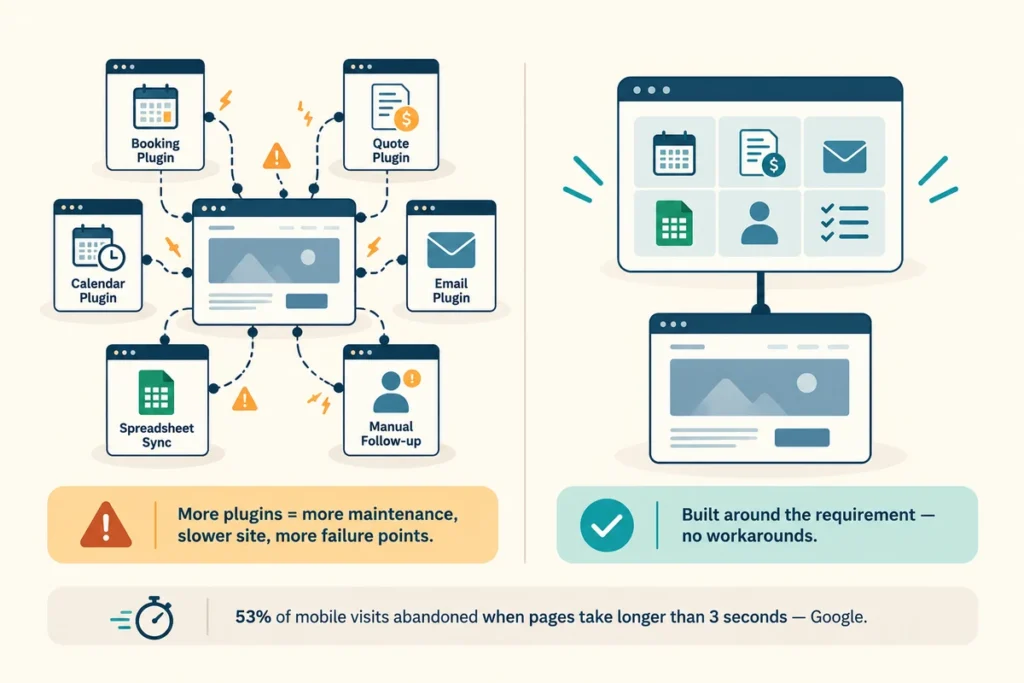
Generic website features fall short because they’re built to serve common business needs rather than the specific way your company operates.
For example, a standard booking form might work for a business with one service and one calendar. If you have different services, staff, locations, or availability rules, you can quickly end up relying on multiple plugins and manual workarounds.
The same problem can appear with quote requests. A basic form might collect a name, email address, and message, while your team needs specific project details before it can price the job. Someone then has to follow up for the missing information.
Having rebuilt dozens of WordPress theme sites for service companies, we’ve seen how these limitations can create extra work. Owners add plugins to fill the gaps, while staff spend time moving information between forms, spreadsheets, emails, and other systems.
Those workarounds also come with a technical cost. More plugins mean more software to maintain, and poorly integrated features can affect site speed and the user experience. Google reports that 53% of mobile site visits are abandoned when a page takes longer than three seconds to load.
A custom feature addresses the underlying problem by making the website handle the process your business uses. Instead of adding another workaround, you build the functionality around the requirement in the first place.
Which Website Features Solve Everyday Business Problems?
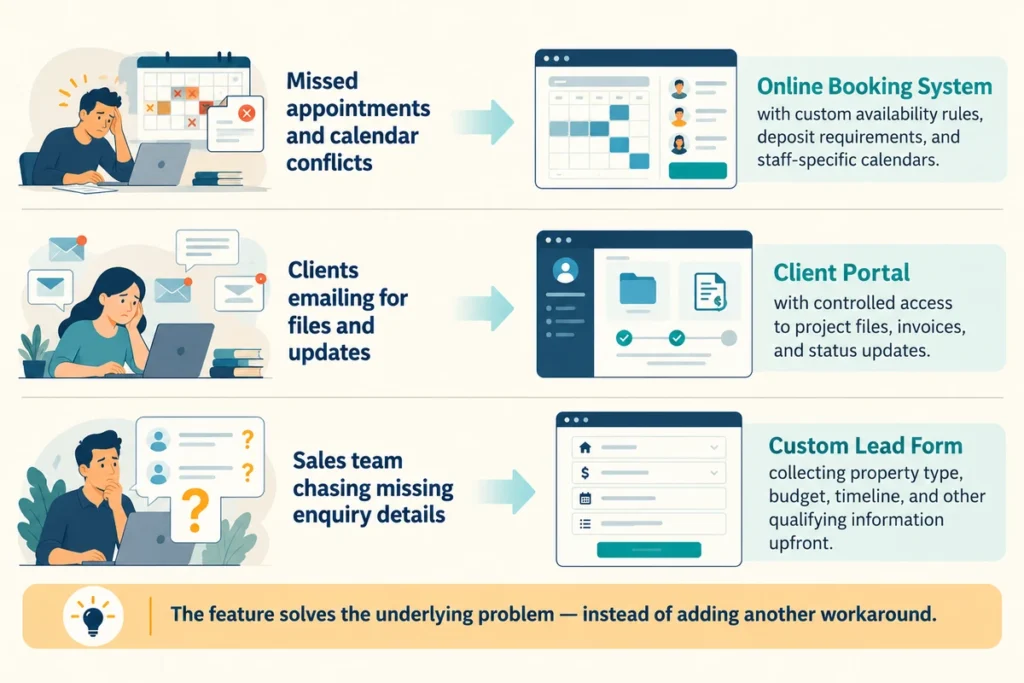
We’ll get to why custom features solve these problems shortly. First, it helps to look at the everyday problems businesses are trying to fix. Scheduling appointments, managing client requests, and sorting incoming leads can all create unnecessary admin when your website can’t handle them properly.
These are the kinds of problems custom website features can solve. Let’s look at three of the most useful ones.
Online Booking Tools That Cut Missed Appointments
An online booking system can let customers choose an available time without calling your office. When it’s connected to your real calendar, it can also prevent two customers from booking the same slot.
Custom booking rules make the system more useful. You might need 48 hours’ notice for site visits, a deposit before weekend appointments, or different availability for different team members.
Those rules can be built into the booking process, so your front desk doesn’t have to check every request manually. Customers get a faster way to book, while your team spends less time managing the calendar.
Client Portals and Content Management Made for Your Team
Say a client needs the latest project file or wants to check the status of their job. Without a client portal, they might email your team, wait for a reply, and start another thread the next time they need something.
A custom portal gives them a dedicated place to access project files, invoices, and updates while letting you control what each client can see. You can also connect it to the parts of your workflow they need to interact with, rather than sending information manually each time.
On the admin side, you can customise the website around the tasks your staff handles regularly. They might update pricing, staff bios, or other content without asking a developer to make every small change.
That gives clients quicker access to information and gives your team more control over the website without adding another round of emails.
Lead Generation Forms That Match Your Sales Process
A standard contact form usually asks for the basics: name, email address, phone number, and a message. But a roofing company might also need to know:
- Property type
- Roof condition
- Project size
- Budget
- Preferred timeline
A basic form can’t collect all that information without becoming a long list of questions. A custom form is different. You can add as many fields as your sales process requires and collect exactly the information your team needs.
The completed enquiry can then go to the right person with all the relevant details already attached. Your team spends less time chasing missing information and more time speaking with qualified prospects.
When Should You Choose Custom Website Development?

Custom development makes sense when your website needs to handle a process that standard features can’t support properly.
A basic business website usually doesn’t need custom development. If you need a few pages, a contact form, standard ecommerce, or a simple blog, an existing theme and well-supported plugins can often do the job.
The case for custom development gets stronger when your requirements become more specific. You might need a booking system with your own availability rules, a client portal with different access levels, or a lead form that collects information your sales team needs before following up.
You may also need custom development when several parts of your workflow need to work together. For example, a booking could need to update your calendar, collect a deposit, send confirmation emails, and notify the right staff member automatically.
At that point, adding another plugin may only patch one part of the problem. Custom development lets the website handle the process around the way your business works.
The goal isn’t to make your website custom for the sake of it. It lets you build the specific functionality you need when standard options create extra work rather than reducing it.
Planning a Custom Website That Fits Your Business Goals
Once you know which features you need, plan the project itself. Planning keeps a custom website design on schedule and stops scope from drifting past the budget you approved.
Work through the three steps below before you sign with a firm that sells design and development services.
How to Build a Feature List Before Development Starts
Write down every task your team handles by hand for one full week, then mark the ones a website could take over. This list becomes your starting point for deciding which features you need. Rank each item as must-have, nice-to-have, or later, so the first phase focuses on the features your business needs most.
Questions to Ask a Web Design Team
After you’ve worked out what your website needs to do, you’re ready to speak with developers. Ask for examples of projects similar to yours and look at what those websites do beyond their visual design. A strong portfolio should show how the developer solved specific business requirements.
Then find out who owns the code, how updates work after launch, and what happens when you request changes. Clear answers about timelines, ownership, and ongoing support give you a better idea of what you’re paying for.
What a Custom Website Costs and Why It Pays Off
A custom website can cost anywhere from $5,000 to $25,000, depending on the features, integrations, and development work involved. You’ll also need to budget for ongoing costs such as hosting, maintenance, and support after launch.
So before you choose a developer, look beyond the initial quote. Ask what the price includes, which ongoing costs you’ll need to cover, and what you’ll pay for future changes or support.
Once you have those numbers, you can compare the cost of the website with the problem you’re trying to solve. If your team is losing hours to manual work or missing leads because your current site can’t handle the process, the investment can make financial sense.
Ready to Solve Your Business Problems with a Custom Website?
If you’ve read this far, you should have a clearer idea of how custom website features can solve specific problems in your business. Now it’s time to put that into action.
Start by listing the tasks that take up your team’s time and identify which ones your website could handle. That gives you a practical starting point for deciding which features to build first.
And if you’d rather leave the planning and development to a professional, get in touch with GeckoTag. We design and build websites around how your business works, with custom features built around the problems you need to solve.